GST Refund: Annexure-B Offline Utility for Accumulated ITC
GSTN ka important update for Exporters, SEZ Suppliers & Inverted Duty Refund Claims
GST refund claim file karte waqt Annexure-B ek important document hai, particularly un refund applications mein jahan refund accumulated Input Tax Credit (ITC) ke basis par claim kiya ja raha hai.
GSTN ne 18 May 2026 ko ek important advisory issue ki hai jisme standardised Annexure-B Offline Utility introduce ki gayi hai.
Pehle taxpayers specified refund applications ke saath Annexure-B ko generally PDF format mein upload karte the. Ab GSTN ne invoice-level information ko structured format mein capture karne ke liye Excel-based Offline Utility introduce ki hai.
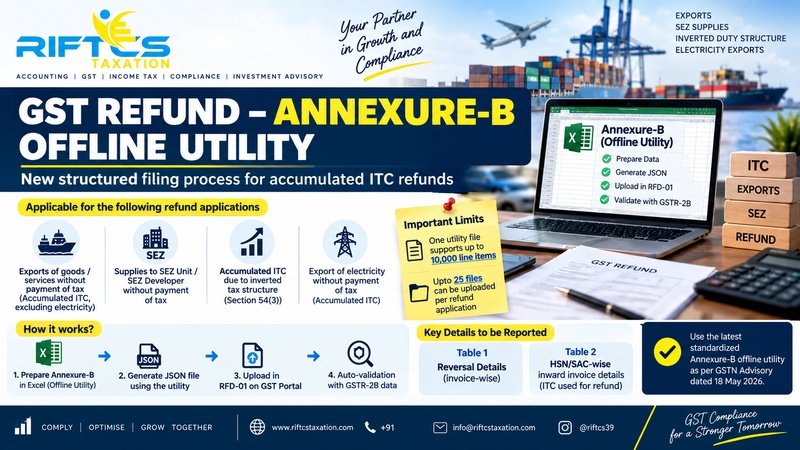
Kin GST Refund Applications mein Annexure-B Offline Utility lagegi?
GSTN ke advisory ke according, Annexure-B Offline Utility following categories ke refund applications mein required hai:
1. Export of Goods / Services without Payment of Tax
Jahan exporter LUT/Bond ke under without payment of IGST export karta hai aur accumulated ITC ka refund claim karta hai.
Note: Export of electricity ke liye separate category prescribed hai.
2. Supplies to SEZ
SEZ Unit ya SEZ Developer ko without payment of tax supply ki gayi ho aur accumulated ITC ka refund claim kiya ja raha ho.
3. Inverted Tax Structure
Jahan input tax rate output tax rate se higher hone ke karan ITC accumulate ho gaya hai aur taxpayer Section 54(3) ke relevant provision ke under refund claim karta hai.
4. Export of Electricity
Export of electricity without payment of tax involving accumulated ITC bhi specified category mein included hai.
Annexure-B Offline Utility mein kya details bharni hongi?
New utility mein taxpayer ko invoice-wise inward supply details enter karni hongi.
Information ko:
- HSN/SAC-wise
- Input-wise
- Input Service-wise
- Capital Goods-wise
properly segregate karna hoga.
Relevant fields mein taxable value, tax amount aur ye information bhi deni hogi ki ITC Section 17(5) ke under blocked hai ya nahi.
Simple example
Agar ek purchase invoice mein:
- Input – HSN 1234
- Input Service – SAC 9983
- Capital Goods – HSN 8471
teen different categories hain, to same invoice ko separate line items mein report karna hoga.
Invoice value aur tax amount ko applicable basis par proportionately distribute karna hoga.
Annexure-B Utility ke andar 2 Important Tables
New Offline Utility mein broadly do tables hain:
Table 1 – Reversal Details
Is section mein applicable ITC reversals report karne honge.
For example, Rules 38, 42, 43 aur Section 17(5) se related reversals ko corresponding GSTR-3B information ke according report karna hai.
Other ITC reversals appearing in Table 4(B)(2) of GSTR-3B bhi appropriately report karne hain.
Table 2 – HSN/SAC-wise Inward Invoice Details
Is table mein woh inward invoices report kiye jayenge jinke ITC ko refund calculation mein consider kiya gaya hai.
Multiple HSN/SAC wale Invoice ka kya karein?
Ye point bahut important hai.
Agar ek invoice mein multiple HSN/SAC codes hain, ya ek hi invoice mein Inputs + Input Services + Capital Goods ki different categories hain, to invoice ko separate line items mein split karna hoga.
Har line item mein:
One Input Category + One HSN/SAC
report karna hoga.
Invoice value aur tax amount ko relevant line items mein proportionately allocate karna hoga.
Duplicate Invoice Validation
GSTN ne duplicate checking bhi introduce ki hai.
System following details ke combination ko validate karega:
- Supplier GSTIN
- Invoice Number
- Invoice Date
- Category of Input Supply
- HSN/SAC
Agar same parameters ke saath same invoice multiple times report kiya gaya hai, to duplicate entry accept nahi hogi.
Isliye Annexure-B prepare karne se pehle purchase data ki proper reconciliation bahut important hai.
Annexure-B se JSON file kaise banegi?
Basic process simple words mein:
Excel Offline Utility → Data Entry → Validation → JSON Generation → GST Portal par Upload → System Validation
Taxpayer ko Annexure-B Offline Utility mein data prepare karna hai.
Uske baad utility ke through JSON file generate karni hai.
Generated JSON ko GST Portal par Form RFD-01 ke refund application screen par:
“Click to upload the Statement of invoices (Unutilized ITC)”
option ke through upload kiya jayega.
GSTR-2B se Validation
New system ka ek major advantage hai ki uploaded invoices ko applicable cases mein GSTR-2B ke against validate kiya jayega.
System validation ke baad:
Valid Documents
Un invoices ki details available hongi jo validation mein accepted/present hain.
Invalid Documents Report
November 2024 onwards ke applicable periods mein agar invoice validation mein mismatch/failure hota hai, to details Invalid Documents Report mein reflect hongi.
Important point regarding older invoices
GSTN has specifically clarified that invoices pertaining to GSTR-2B periods up to October 2024 or earlier will not be validated against GSTR-2B data by the system.
Such invoices can still be entered and uploaded. A generic message may show that the invoices were not validated, but GSTN says this is expected system behaviour and should not be treated as an error.
Maximum Number of Invoices / Line Items
GSTN has prescribed the following current system limits:
One Offline Utility File: Up to 10,000 line items
One Refund Application: Up to 25 utility files
Therefore, up to:
2,50,000 line items
can currently be uploaded through the offline utility for a single refund application.
If the number of invoices exceeds this limit, GSTN has provided for the remaining invoices to be submitted as supporting documents in PDF format, while higher-volume data ingestion is being evaluated for future enhancements.
Important Precautions While Preparing Annexure-B
Taxpayers should be particularly careful about the following:
✔ Use the latest Offline Utility
Before starting the work, download the latest version of the Annexure-B utility from the GST Portal.
✔ Avoid unnecessary spaces
Extra spaces while copying or entering data can result in validation or JSON-generation errors.
✔ Be careful with dropdown values
If values are copied and pasted into dropdown fields, they should exactly match the prescribed dropdown value. Even leading or trailing spaces can create problems.
✔ Don't edit the JSON manually
Once the JSON is generated, taxpayers should not make direct changes to the JSON file.
If any correction is required, make the correction in the Offline Utility, revalidate the data and generate a fresh JSON file.
Why is this change important?
The new Annexure-B utility is intended to make GST refund filing more structured, standardised and system-driven.
Instead of simply uploading a PDF statement, taxpayers now need to provide structured invoice-level information.
This means that GST purchase data, GSTR-2B, GSTR-3B, ITC reversals and refund workings should ideally be reconciled before filing the refund application.
A small mismatch in invoice number, date, supplier GSTIN, HSN/SAC or ITC amount can potentially lead to validation issues.
Quick Checklist Before Filing GST Refund
Before submitting an accumulated ITC refund application, taxpayers should check:
☑ Correct refund category selected
☑ Purchase invoices properly reconciled
☑ Supplier GSTIN verified
☑ Invoice number and date checked
☑ HSN/SAC correctly reported
☑ Input/Input Service/Capital Goods classification checked
☑ Section 17(5) blocked ITC identified
☑ ITC reversals reconciled with GSTR-3B
☑ GSTR-2B reconciliation completed wherever applicable
☑ Multiple HSN/SAC invoices properly split
☑ Duplicate invoices removed
☑ Latest Annexure-B Offline Utility used
☑ JSON generated only after validation
☑ JSON uploaded through RFD-01
Final Takeaway
GST refund filing has become more data-driven.
For refund claims involving accumulated ITC, taxpayers should no longer approach Annexure-B as merely a PDF attachment. The new GSTN Offline Utility requires invoice-wise and HSN/SAC-wise structured reporting, followed by JSON generation and portal validation.
Proper reconciliation of Purchase Register + GSTR-2B + GSTR-3B + ITC Reversals + Refund Working before filing can significantly reduce the chances of validation errors and delays.
Need Assistance with GST Refund?
RIFTCS Taxation can assist businesses with:
✓ GST Refund Applications
✓ Accumulated ITC Refund
✓ Export Refunds
✓ SEZ Refunds
✓ Inverted Duty Refunds
✓ Annexure-B Preparation
✓ GSTR-2B & ITC Reconciliation
✓ Refund Documentation & Compliance
Get your GST refund workings reviewed before filing.
Disclaimer: This article is for general information and educational purposes. The article is based primarily on the GSTN advisory dated 18 May 2026. Taxpayers should refer to the latest GST Portal instructions, applicable law and subsequent advisories before filing a refund application.
Official source
The GST Portal lists the advisory dated 18 May 2026 under its News & Updates section.